

Streams: geo, devices and other conditions
A stream sends part of the traffic to a separate URL by country, device, source and other conditions; the first matching stream from the top wins.
A stream sends part of the traffic to a separate URL: for example, people from the US to one page and everyone else to the main one. You add streams with the Stream button in the Traffic route block.
The block is the same in both account modes. In Links mode, open a template. In Tracker mode, open a campaign: there a stream has one more destination, Offer.
How streams are checked
The filter decides first whether the visitor is a bot, and bots do not reach the streams. Then streams are checked from top to bottom, and the first matching one wins. If none matches, the visitor goes to the main URL.
If the filter is set to Only mark, send like people, a bot goes on as a person and also reaches the streams. Only a stream with the Treat as bot destination catches it: the click is marked as a bot and goes to the bot URL. More in Bot filtering.
Put narrow conditions above broad ones. You reorder streams by dragging a row. If a stream can never fire because of a stream above it, the dashboard marks it never runs. A stream with no destination is marked no destination.
The stream window
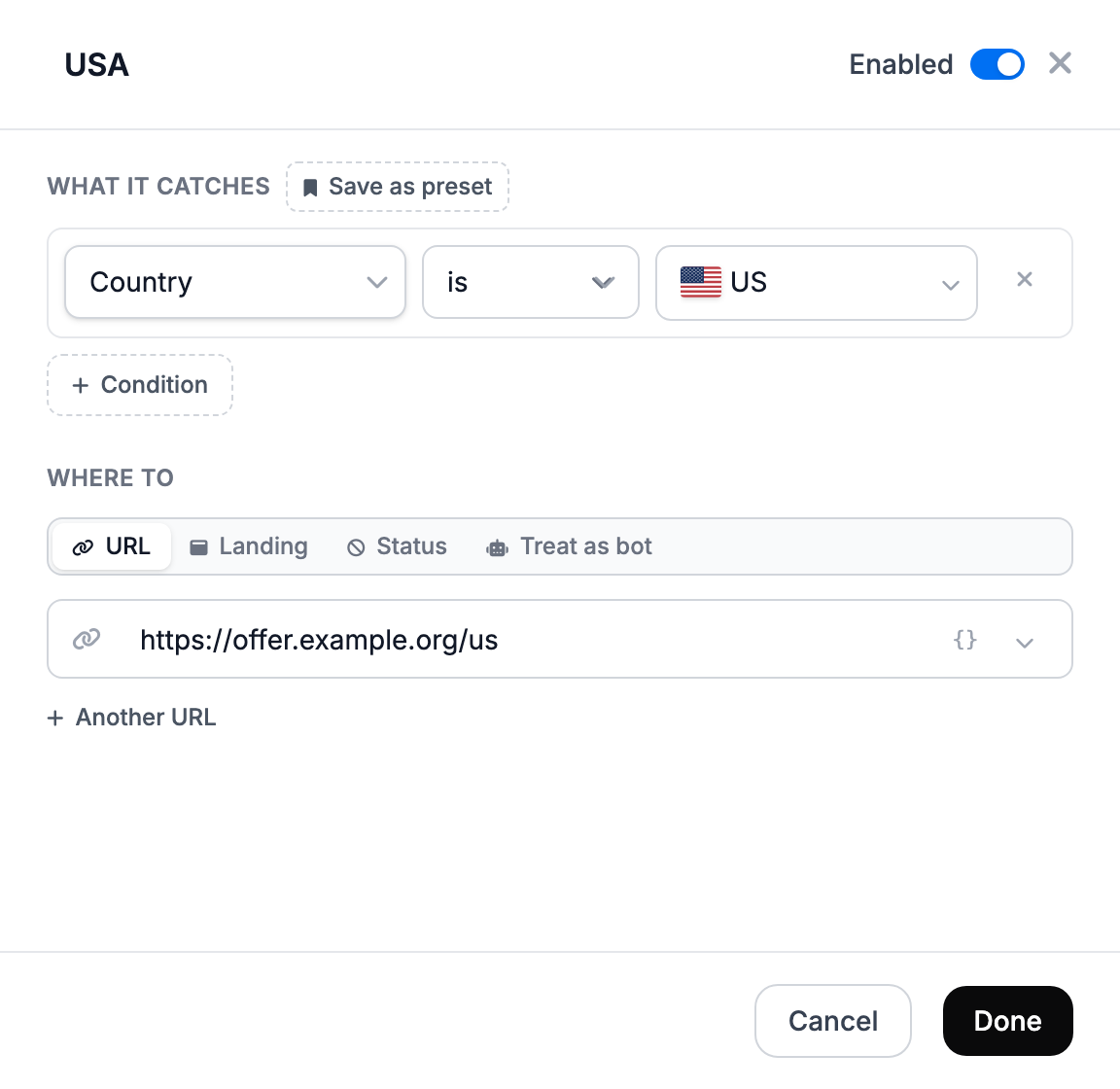
In the stream window you set the name, the conditions and the destination. The Enabled switch turns a stream off without deleting it. A stream can be saved once it has at least one condition and a destination; otherwise the dashboard hints Add at least one condition.
The row menu lets you duplicate a stream, save it as a preset and delete it. Preset inserts a ready set of conditions: US Mobile, EU Desktop, Tier 1 GEOs, iOS, Android, Weekdays, No Proxy / VPN, Direct Traffic. Your own sets are under My presets. Save as preset saves one stream, Save all streams as a set saves all of them.
In a campaign, a stream row shows clicks, conversions and revenue for today or the last 7 days.
Where a stream can lead
| Destination | What the visitor gets |
|---|---|
| Offer | an offer from the catalog. Available only in a Tracker-mode campaign |
| URL | a redirect to the URL. Another URL adds more, Set shares opens a share field for each |
| Landing | your landing page. Another landing adds more |
| Status | an empty response with code 404, 403, 500 or 205. The click is recorded |
| Treat as bot | the click is marked as a bot and goes to the bot URL. A way to cut off traffic that the filter let through |
A share is a number from 0 to 1000. Shares are read relative to their sum: 1 and 3 give 25% and 75%. Without shares, traffic is split equally.
How to choose from several URLs
The How to choose field appears when there is more than one URL.
| Mode | What the visitor gets |
|---|---|
| At random | a random URL, weighted by shares |
| Keep the same | a returning visitor gets the same URL. The remember for field sets the period in hours, 1 to 8760, 24 by default. A URL with a share of 0 takes no new visitors but keeps those already pinned |
| A different one | a returning visitor gets a different URL |
| In turn | URLs go round in a circle: A, B, A, B. Shares set how often each one comes up. The cycle is at most 200 slots. The counter is shared by the link and the URL list and kept for 30 days. Bots and check pages take no turn |
The mode is chosen once and applies to the main URLs and to the URLs inside streams. The hint in the stream window says random, but the redirector applies the chosen mode there too.
Conditions
Each condition has two variants: is and is not. In one condition you can list several values separated by commas: it matches if any of them fits. If a stream has several conditions, All requires all of them to match, Any at least one. The Condition button adds another one.
| Condition | What to enter | Example |
|---|---|---|
| Country | pick from the list | US, DE |
| City, Region / State | name in English | Berlin; CA |
| ISP / Provider | part of the provider name | T-Mobile |
| Host name (rDNS) | part of the visitor's host name | compute.example.com |
| IP Address | an address or subnet | 203.0.113.7, 203.0.113.0/24 |
| Proxy / VPN | turn on | none |
| Device | Desktop, Mobile or Tablet | none |
| Device Model | part of the model name | iPhone, Galaxy S24 |
| Device Brand | brand name | Samsung |
| OS, Browser, Browser engine | pick from the list | none |
| OS Version, Browser Version | version number | 17, 120 |
| User-Agent | part of the User-Agent string | Instagram |
| Language | two-letter browser language code | ru, en |
| Timezone | the visitor's offset | UTC+3 |
| Referrer | part of the address of the site the visitor came from | facebook.com |
| Direct (no referrer) | turn on | none |
| URL Parameter | name=value from the link address | utm_source=fb |
| HTTP Headers | Name=value or just the header name | X-Requested-With=com.facebook.katana |
| Unique visitor, Returning visitor | turn on | none |
| IP click count | a number: matches when one IP has made this many clicks or more | 3 |
| Total visit count | a number: matches when this IP had this many visits or more in the last 7 days | 5 |
| First N visits | the number of first clicks. The counter lives for about an hour | 100 |
| Click cap | see below | 500 per day |
| Day of Week, Days of month | pick days; days of the month separated by commas | 1, 15 |
| Time of day | hours in UTC; the last hour is excluded | 9-18: 9:00 to 17:59 |
| Date range | two dates separated by a comma | 2026-11-01,2026-11-30 |
Text conditions (provider, host name, referrer, User-Agent) look for a substring. Device and language are compared for equality.
Day of Week and Time of day are counted in UTC: for Moscow, subtract 3 hours. Days of month and Date range are counted in the visitor's time zone.
Click cap
Click cap limits a stream: a number, a period (per hour, per day, in total) and the operator at most. When a stream reaches its cap, its clicks pass on to the next streams. Hours and days are counted in UTC. The counter is shared by all links of one template or campaign. Bots caught by the check are not counted.
A cap on an offer rather than a stream is described in Offer cap.
Common tasks
| Task | How to set it up |
|---|---|
| Different offers for different countries | one stream per country, the main URL for everyone else |
| A separate offer for iOS and Android | the OS condition in two streams |
| Traffic from one source to its own URL | URL Parameter utm_source=… in the ad link and in the stream |
| A different page for returning visitors | a stream with the Returning visitor condition |
| Cut off traffic through VPN and proxies | a Proxy / VPN stream with the Treat as bot destination |
| Traffic from the Facebook or Instagram in-app browser | the User-Agent condition with the values FBAN, FB_IAB, Instagram |
| Different URLs during the day and at night | Time of day in UTC |
| Show the offer only during a promotion | Date range |
| Send no more than 500 clicks a day to a URL | Click cap, then a stream below it |
Streams and existing links
In Links mode, streams are copied into a link when it is created. After you edit streams in the template, the dashboard offers to update the links too, otherwise they keep working with the old streams. A single link can have its own streams, see template and links.
In Tracker mode a link is the campaign itself: you edit streams there and there is nothing to update.
Domain problems
Why a domain is not added or does not open — No response received, Not linked, Banned, no HTTPS — with the cause and the fix for each case.
Bot filtering: levels and lists
The bot filter decides which clicks count as bots: four levels from Off to JavaScript, a bot action, quarantine and your own IP and User-Agent lists.