

For the mode «Tracker»
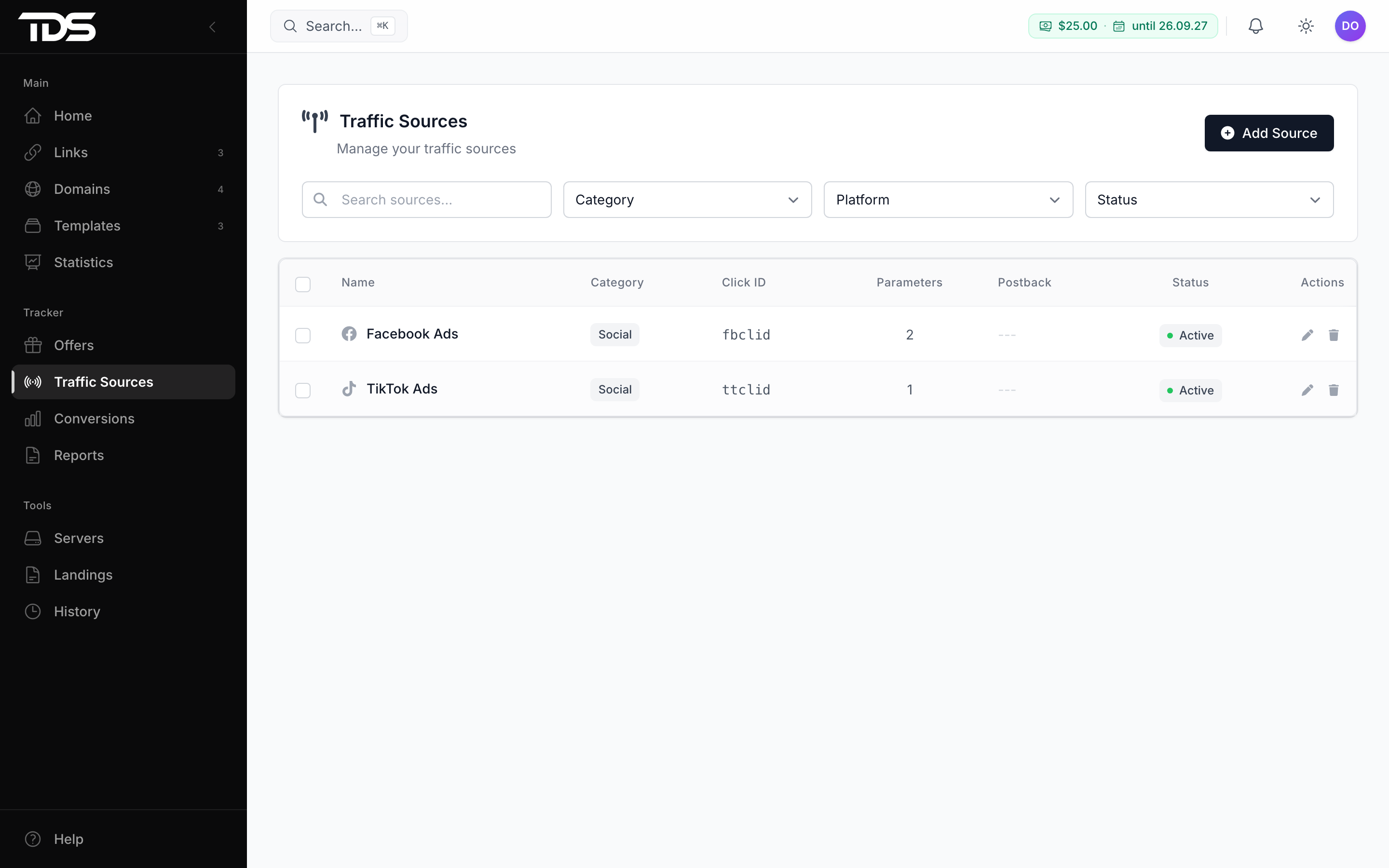
Traffic sources
A traffic source describes an ad network: how it passes the click number and price, and where TDS.SO sends the conversion postback. The catalog has 109 networks and a Custom source option.
A traffic source is the ad network where clicks come from. It records how the network passes its own click number and price, and where to send the conversion message. Sources live in Tracker → Traffic Sources.
How to add a source
Click Add Source. The create window has two steps: pick a network, then adjust it.
The catalog has 109 networks and Custom source. The search field reads Search 109 networks, with Popular networks above it. Each card shows tags: tags (how many parameters are prefilled), price, postback and click ID only. Networks are grouped into categories: Social, Native, Push, Popup, Search, Adult, Apps & PWA, Email, SEO and Other.
Picking a network fills the form: the click number parameter, the price and tag parameters, and a ready outgoing postback. Check them against the network help and fix them if the network changed its macros. If your network is not in the list, choose Custom source and fill everything yourself.
What the network passes in the URL
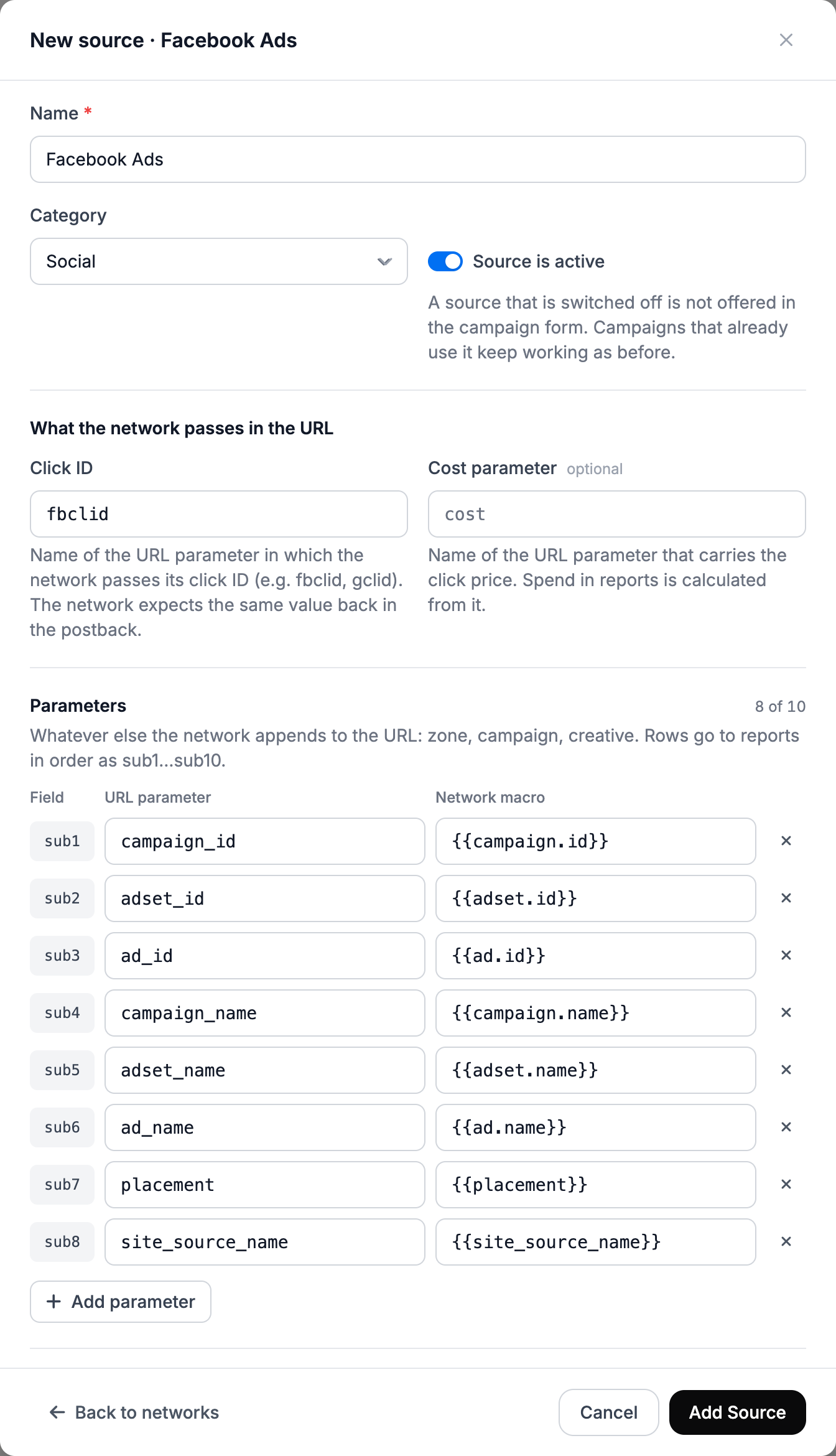
The form has common fields: Name, Category and the Source is active switch. If you turn it off, the source is not offered in the campaign form, but links already created keep working.
The What the network passes in the URL section:
| Field | Meaning |
|---|---|
| Click ID | The name of the URL parameter in which the network passes its own click number, for example fbclid or gclid. The network expects the same value back in the postback. TDS.SO stores it as the network click ID and puts it into the {external_id} macro. |
| Cost parameter | Optional. The name of the parameter with the click price. |
| Parameters | Up to 10 rows: a URL parameter name and a network macro. |
Rows in Parameters go in order and land in the click fields sub1…sub10. The first row goes to sub1, the second to sub2. If you remove or reorder a row, the following numbers shift, and in reports on clicks already collected the values end up under the wrong numbers. The form warns about this. Further down there is a block with the string to append to the link in the network cabinet. Copy it from there.
Allowed IPs for incoming postbacks: an address or a CIDR range, one per line. If the list is empty, postbacks are accepted from any address. If it is set, a postback for a click of this source from another IP is rejected with the result "IP not allowed".
Click price and spend
The tracker takes spend from clicks. The price comes from this order:
- If the source has a Cost parameter and the network passed a number in it, that number is used.
- If the network passed no price, the campaign's Click cost is used. In the campaign form it sits next to the source selector.
- If there is no price anywhere, the click spend is zero and ROI cannot be calculated.
The Cost currency field sets the price currency, Same as tracker (USD) by default. If the network substitutes the price in another currency, pick it and enter Rate: 1 … = how many …. You set the rate yourself: the tracker has no rate source of its own. Without a rate the network price is not accepted, and spend is calculated from the campaign's Click cost.
Spend in reports is the sum of prices of all clicks, bots included. The money formulas are in Tracker.
If you need to correct spend for past days, the link edit form has an action to enter spend for past days. You set a sum for the period or a click price, the period is at most 31 days and has no future days. The new price replaces the old one for clicks of that period.
Postback to the ad network
So that the network can optimize campaigns by conversions, you set Outgoing postbacks in the source: addresses where TDS.SO reports a conversion. You can set up to 10 addresses.
Each address has these fields:
| Field | Meaning |
|---|---|
| Event | Any, No event, Registration, Deposit or Redeposit. The postback is sent only for this event. |
| When to send | On receipt: right after any accepted postback. Approved only: only if the conversion status is approved. |
| Method | GET or POST. |
| URL | The network address with macros. |
Example address:
https://network.example.net/pb?click_id={external_id}&payout={payout}&status={status}TDS.SO fills in these macros: {click_id}, {external_id}, {sub1}–{sub10}, {payout}, {currency}, {status}, {goal}, {conversion_id}, {ip}, {country}, {device}, {os}, {browser}, {referer}, {cost}, {ts}, {offer}, {campaign}. Values are URL-encoded. An unknown macro is sent as is, and the form shows a warning. If a placeholder XXXXX is left in the address, the form warns about it too.
The Test button sends a real request to the network with sample values and shows the final URL, the response code, the response and the time. No more than 10 tests per minute.
When the postback is sent
- A postback is queued after every accepted incoming postback from the affiliate program. Rejected conversions are not sent to the network.
- For one combination of click, conversion ID, event and postback, the message goes out once. A repeated or confirming incoming postback does not create a second message.
- If the address contains
{external_id}and the click has no real network click number, the postback is not sent. - The queue is processed every minute. Any 2xx response counts as success. The wait for a response is up to 10 seconds.
- If the network did not answer or returned an error, there are five more attempts: after 1, 5, 15 and 60 minutes and after 6 hours. After the sixth failure the delivery gets the status "not delivered" and is not repeated.
- An address the tracker refuses to call for safety reasons (for example, an internal network) fails at once, with no retries.
The result of each delivery is shown in Conversions on the Outgoing postbacks tab: delivered, not delivered or queued. The incoming postback log is described in Conversions and postbacks.
Edit, copy or delete a source
The list has search and filters by status (active or not), category and network. Row actions: edit, duplicate and delete.
- Duplicating creates a copy named "name (copy)". Use it for a second account of the same network: parameters and postbacks go into the copy.
- Deleting does not break links, but they lose what the source was for: the tag layout, the network price and postbacks to the network. Before deleting, the form shows how many links are affected.
- You can select several sources and delete them at once.
Offers
Add an offer in Tracker → Offers: a name, the affiliate address with the click number, a payout and, if you want, a daily cap with a fallback offer.
Conversions and postbacks
The affiliate program reports a conversion with a request to your postback address that carries the click number. Build the address in Conversions → Receiving conversions → Affiliate network.